Speak with confidence in every real estate conversation
OmniMindPro supports real estate professionals with thoughtful follow-up, re-engagement, and clear market explanations — designed for real conversations, not automation
Three AI Assistants Built Specifically for Realtors
🧭 Handle follow-ups with confidence
🔄 Revive cold and unresponsive leads
📊 Explain the market clearly to buyers and sellers
Each assistant writes the email and text messages for you — plus clear talking points for phone calls and conversations.
Without guessing what to say — or when to say it.
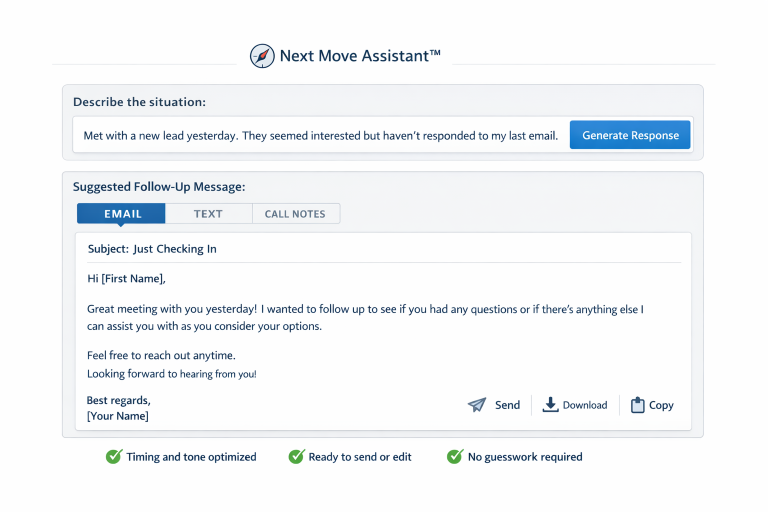
🧭 Next Move Assistant™
Never wonder what to do next with a lead.
Get clear guidance on the next message, follow-up timing, or action to move buyers and sellers forward — based on the situation you describe.
This replaces uncertainty.
🔄 Re-Engagement Assistant™
Bring cold and unresponsive leads back to life.
Generate smart re-engagement messages for past clients, stalled conversations, and “maybe later” prospects — without sounding awkward or pushy.
This replaces hesitation.
📊 Market Insight Explainer™
Explain the market in plain English — without sounding scripted.
Turn market conditions, price changes, and buyer hesitation into clear explanations your clients actually understand and trust.
This replaces confusion.
How it works:
Describe the situation (a lead, a listing, or a market question)
OmniMindPro writes the response emails, texts, or clear talking points
Send it, post it, or download it
No setup.
No templates.
No learning curve.
Built for How Realtors Actually Work
Most Realtors don’t need more software — they need help knowing what to say, when to say it, and how to stay consistent. OmniMindPro was built to solve those exact problems in one place.
Additional Tools Included with OmniMindPro
These tools are included alongside the AI assistants for creating images, video, voiceovers, and transcriptions — all in one platform.
Simple pricing. One plan. Full access.
Start with a free 3-day trial and see how it fits into your daily workflow.